
The TIL (Today I Learned) page gathers short tips and pieces of information that I don’t want to loose, but that are not enough to write a dedicated article about. They can be about software engineering and coding, about digital everyday tools, career related… (Thank you to Julia Evans who shared about TILs!)
I created another page to save useful links regarding software development, career, soft skills, wellbeing, online tools… You might also be interested in my Cheat Sheets on GitHub (Docker, Git, Kotlin, Kubernetes, Linux, Postgres…)
- Xbox game controller connected with bluetooth keeps on turning off while playing on a Windows computer
- Ebook converted to epub with Calibre fails during Send to Kindle
- Using Microsoft IME Japanese input with an Azerty keyboard
- Replacing French«» quotation marks by English“” quotation marks on WordPress
- Creating a full back-up (with pictures) of a Substack publication
- Preventing Google search from triggering AI generated answers
- Knowing which photos are not in an album in Google Photos
- Sharing your “liked songs” Spotify playlist with someone
- Moving objects freely in Canva
- Allowing screenshots from Netflix in Chrome (and Chrome-based browsers)
Xbox game controller connected with bluetooth keeps on turning off while playing on a Windows computer
In Device Manager, search for the Xbox controller (should be Human Interface Device > Bluetooth LE XINPUT compatible input device). Right click to access Properties, then in Power Management uncheck “Allow this computer to turn off this device to save power”. (It might get checked again after an update, happened to me after several months working fine.)
Ebook converted to epub with Calibre fails during Send to Kindle
If your other ebooks converted to epub with Calibre work just fine during the Send to Kindle process, but one keeps on failing, this trick works for me every time:
- Convert to Mobi
- Remove the epub
- Convert to epub
The newly created epub file should do just fine.
Using Microsoft IME Japanese input with an Azerty keyboard
By default, Microsoft IME works with a Qwerty layout, which means when typing “a” you get a “q”, and so on.
In order to use your Azerty keyboard for Japanese input with Microsoft IME:
- Open the registry (start menu -> type “regedit.exe” then press enter)
- Navigate to HKEY_LOCAL_MACHINE > SYSTEM > CurrentControlSet > Control > KeyboardLayouts > 00000411 (double-check it’s the Japanese one)
- Rename the layout file KBDJPN.DLL to:
- KBDFR.DLL for French Azerty
- KBDBE.DLL for Belgian French Azerty
- For other layouts, check the KBD layout website (find your local layout, then check the name of the DLL file under the title)
- Once done, restart your computer. You can know use your actual keyboard layout to type in Japanese!
(According to online discussions, it should work with Google IME)
Replacing French«» quotation marks by English“” quotation marks on WordPress
In the function.php file, add the following code:
/**
* Write some documentation to remember why you added this ;)
**

function start_modify_html() {
    ob_start();
}

function end_modify_html() {
    $html = ob_get_clean();
    $html = str_replace(['«','»'], '"', $html);
    echo $html;
}

add_action( 'wp_head', 'start_modify_html' );
add_action( 'wp_footer', 'end_modify_html' );
Creating a full back-up (with pictures) of a Substack publication
Substack has a button to download your publication content, however it doesn’t contain any picture or other media, but only links to the media on Substack’s servers (in the html code). One way to create a full back-up including the pictures is to upload the exports on a WordPress website with the Substack importer plugin, which has an option for importing file attachments to the server when WP is hosted. It also works with a local WP.
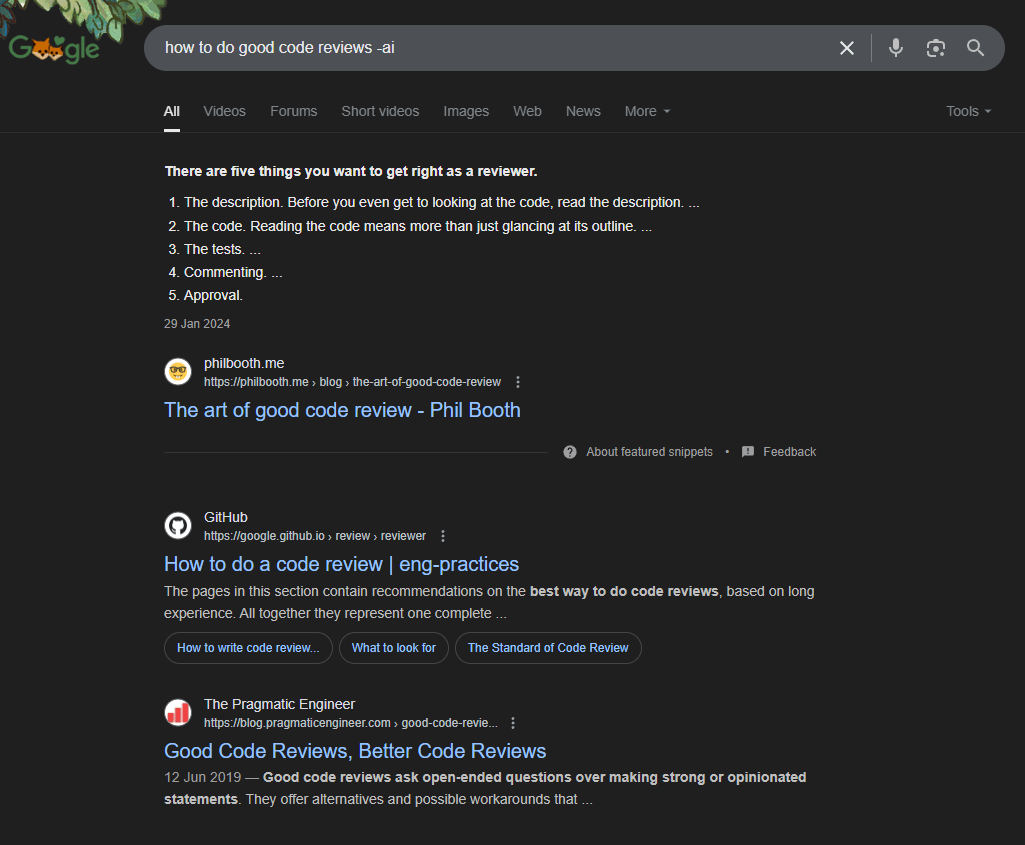
Preventing Google search from triggering AI generated answers
Just suffix your search term with “-ai”. One downside is that you can’t use the expression “ai” elsewhere in your search.
Or use &udm=14.
Knowing which photos are not in an album in Google Photos
To get a clear view of your “loose” photos in Google Photos, you can Archive the pictures after you added them to an album. That way, they don’t appear anymore on the general page, but are not removed from albums either.
Sharing your “liked songs” Spotify playlist with someone
Cannot be done as is, but you can easily duplicate your Like songs playlist into a custom playlist that is shareable. Both playlists won’t be dynamically linked, so you’ll have to update both playlists over time.
Moving objects freely in Canva
Sometimes items seem to be sticking to an invisible grid when you try to move them. To be able to move them totally freely, hold the Ctrl key while dragging the item.
Allowing screenshots from Netflix in Chrome (and Chrome-based browsers)
Turn off hardware acceleration: Settings > System > Untoggle “Use hardware acceleration when available” > Relaunch. It’s now possible to screenshot Netflix (still working in July 2025). Please use this for private use only.